

🔧 Product Overview
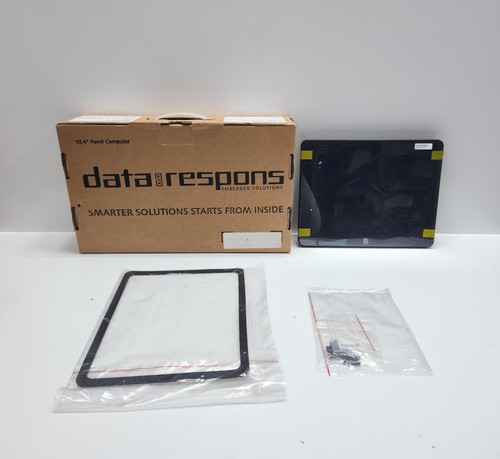
The ROLLS-ROYCE Data Respons MPCF1-10.4″ is a marine-grade panel computer designed for shipboard automation, monitoring, control, and operator-interface applications.
This specific configuration is identified as STBD Wing, Rev D, making the exact mounting position and hardware revision important when selecting a replacement. The MPCF1 platform uses a 10.4-inch marine panel display and is intended for integration with compatible vessel computer and automation systems.
The unit is suitable for marine control rooms, bridge or wing-console installations, machinery monitoring, vessel automation, and other shipboard applications where a dedicated panel computer is required.
⚙️ Key Features
- Rolls-Royce Data Respons MPCF1 marine panel computer
- 10.4-inch display configuration
- STBD Wing installation configuration
- Revision D hardware
- Designed for marine and shipboard environments
- Suitable for vessel automation and monitoring applications
- Suitable for operator-interface and HMI functions
- Panel-mounted computer architecture
- 24 VDC marine power input
- Maximum current rating listed as 1 A for this configuration
- Designed for integration with compatible shipboard systems
- Suitable for maintenance, replacement, and marine retrofit projects
📋 Product Datasheet
| Parameter | Specification |
|---|---|
| Brand | Rolls-Royce |
| Product Family | Data Respons |
| Model | MPCF1-10.4″ |
| Product Name | Maritime Panel Computer |
| Product Type | Marine Panel Computer / Panel PC |
| Display Size | 10.4 inch |
| Installation Position | STBD Wing |
| Hardware Revision | Rev D |
| Power Supply | 24 VDC |
| Maximum Current | 1 A |
| Application | Marine Automation / Vessel Control / Monitoring |
| Marine System | Compatible shipboard automation and control systems |
| Article Number | 000108285 |
| Environmental / Marine Standards | Configuration listed with DNV 2.4 and IEC 60945 |
| Mounting | Marine panel / wing-console mounting |
| Dimensions | Verify against exact mechanical configuration |
| Weight | Verify against exact configuration |
| Condition | New – Open Box |
🖥️ Panel Computer Function
The MPCF1 functions as a dedicated shipboard computing and operator-interface platform. Rather than being treated as a conventional PLC CPU, it is intended to provide the local computing and display interface required by compatible marine automation applications.
A typical architecture can be represented as:
Shipboard Automation Network → MPCF1 Panel Computer → Operator Display / HMI → Control & Monitoring Functions
Depending on the vessel’s original configuration, the computer may be used for:
- Machinery monitoring
- Vessel automation
- Alarm and status visualization
- Control-system operator interface
- Navigation or auxiliary marine applications
- Equipment monitoring
- Shipboard data presentation
The exact software, communication interfaces, and application functions depend on the original vessel installation.
🚢 Marine System Integration
The STBD Wing designation is particularly important. A replacement panel computer may need to match the physical location, mounting arrangement, display orientation, connector positions, and application software of the original installation.
Before replacing an MPCF1, verify:
- MPCF1-10.4″ model
- STBD Wing configuration
- Rev D hardware
- Article number where applicable
- Power input
- Connector arrangement
- Mounting cutout
- Display/touch configuration
- Operating software
- Network configuration
- Application-specific software
- Vessel automation system compatibility
A panel computer that is electrically similar may not be a direct replacement if its mounting or software configuration differs.
⚡ Electrical & Interface Considerations
The identified configuration is rated for 24 VDC with a maximum current of 1 A.
When installing the unit:
- Confirm the vessel’s DC supply voltage.
- Check polarity before energizing.
- Verify the upstream circuit protection.
- Inspect DC wiring and terminal connections.
- Confirm grounding arrangements.
- Check communication cables before startup.
- Verify that connected network devices use the correct configuration.
- Confirm software and IP/network settings after replacement.
Do not apply power until the actual nameplate and vessel wiring documentation have been checked.
🛠️ Installation & Commissioning
- Record the original panel computer’s model, revision, serial number, and software configuration.
- Isolate the appropriate 24 VDC supply according to the vessel maintenance procedure.
- Inspect the panel cutout and mounting hardware.
- Compare the replacement’s connector arrangement with the original unit.
- Install the MPCF1 carefully into the designated STBD Wing position.
- Connect the DC supply and communication cables.
- Check grounding and cable shielding.
- Restore power and observe the startup sequence.
- Confirm display and touch/operator functions if equipped.
- Verify communication with the vessel automation network.
- Confirm application software, alarms, status information, and operator screens.
- Perform functional tests before returning the vessel system to normal operation.
🔍 Troubleshooting Guide
Panel computer does not start
- Check the 24 VDC supply.
- Verify polarity.
- Check the circuit protection.
- Inspect the power connector.
- Check for loose internal or external connections.
Display remains blank
- Confirm that the computer is receiving power.
- Check display connections.
- Verify system startup status.
- Inspect the display/backlight circuitry.
- Check the application software.
Computer starts but does not communicate
- Inspect Ethernet or other communication connections.
- Verify network configuration.
- Check IP address and communication parameters.
- Confirm that the connected automation system is operational.
- Check for configuration differences between the original and replacement unit.
Operator application does not load correctly
- Verify application software.
- Check storage media or system image.
- Confirm software compatibility with the vessel system.
- Check operating-system configuration.
- Restore the approved vessel-specific configuration where applicable.
Intermittent operation
- Inspect DC supply stability.
- Check connectors and cables.
- Inspect grounding and shielding.
- Look for vibration-related connection problems.
- Check the marine environment around the panel installation.
🔧 Maintenance Recommendations
- Keep the display surface clean using an appropriate non-abrasive method.
- Inspect panel mounting hardware during scheduled maintenance.
- Check DC supply voltage periodically.
- Inspect connectors for corrosion or looseness.
- Keep ventilation areas clear where applicable.
- Back up application and configuration data.
- Record software and hardware revisions.
- Maintain a verified spare for vessel-critical installations.
- Protect the panel computer from unauthorized configuration changes.
⚠️ Replacement Compatibility
The MPCF1-10.4″ STBD Wing Rev D should be matched carefully with the existing vessel installation.
Particularly important identification points include:
MPCF1-10.4″ + STBD Wing + Rev D
Related MPCF1 configurations can have different physical positions or mounting arrangements, including PORT Wing configurations. Therefore, a PORT Wing unit should not automatically be considered interchangeable with an STBD Wing unit.
The software image and application configuration should also be verified before commissioning.
❓ FAQ
Q1. What is the Rolls-Royce MPCF1-10.4″?
It is a Data Respons maritime panel computer designed for shipboard automation, monitoring, control, and operator-interface applications.
Q2. What does STBD Wing mean?
STBD refers to the starboard side of the vessel. The STBD Wing designation identifies the intended panel installation position.
Q3. What is the display size?
This configuration is identified as a 10.4-inch MPCF1 panel computer.
Q4. What power supply does it use?
The identified configuration is rated for 24 VDC, with a maximum current of 1 A.
Q5. Is this a PLC?
No. It is a marine panel computer/operator-interface platform rather than a conventional PLC I/O or CPU module.
Q6. Can it be used in vessel automation systems?
Yes. It is intended for compatible marine automation, monitoring, control, and operator-interface applications.
Q7. Can a PORT Wing MPCF1 replace the STBD Wing version?
Not automatically. Physical mounting, connector location, software configuration, and vessel-specific installation must be verified.
Q8. What should be checked before purchasing a replacement?
Check the complete model, 10.4-inch display designation, STBD Wing configuration, Rev D hardware, article number, connectors, mounting arrangement, power requirements, and software configuration.
Q9. Is MPCF1 suitable for marine environments?
The identified configuration is listed with marine-related certifications/standards including DNV 2.4 and IEC 60945.
Q10. Is the listed unit new or used?
The referenced listing identifies the unit as New – Open Box.
🔄 Recommended Related Rolls-Royce Marine Models
- Rolls-Royce Data Respons MPCF1-10.4″ PORT Wing
- Rolls-Royce Data Respons MPCF1-10.4″ STBD Wing
- Rolls-Royce MPCF1 Maritime Panel Computer Rev C
- Rolls-Royce MPCF1 Maritime Panel Computer Rev D
- Rolls-Royce Data Respons Marine Panel PC
- Rolls-Royce Marine HMI Panel Computer
- Rolls-Royce Shipboard Operator Panel
- Rolls-Royce Marine Automation Computer
- Rolls-Royce Vessel Monitoring Panel Computer
- Rolls-Royce Marine Control-Room Computer
📦 Spare Parts Recommendation
For vessel-critical installations, the ROLLS-ROYCE MPCF1-10.4″ STBD Wing Rev D is best managed as a configuration-specific marine computer spare.
When preparing a replacement, retain the original unit’s model, revision, article number, software image, network configuration, connector information, and mounting details. Matching the physical and software configuration is just as important as matching the MPCF1 model number.
 E-mail:dcsplcsales@gmail.com
 Wechat:+86 13365909307
 Phone:+86 13365909307