

Product Overview
The ABB DSQC332, part number 3HAB9669-1, is a digital input/output unit with relay outputs designed for compatible ABB industrial robot control systems, including legacy S4C configurations.
The unit provides an interface between the robot controller and external equipment, allowing digital signals to be exchanged with devices such as sensors, switches, solenoid valves, and other control peripherals. Its relay outputs support switching external circuits within the unit’s specified electrical ratings.
The DSQC332 is an earlier version in the DSQC332 family. Confirm the exact model and controller compatibility before substituting a DSQC332A or another digital I/O module.
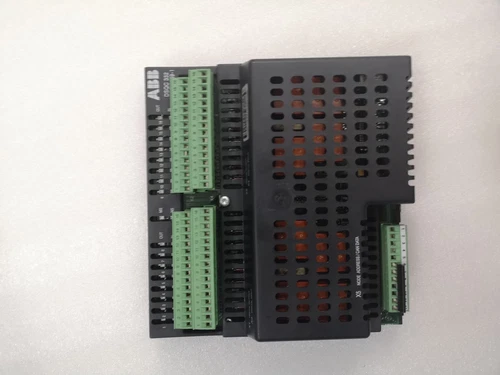
Key Features
- Brand: ABB
- Model: DSQC332
- Part Number: 3HAB9669-1
- Product Type: Digital I/O unit with relay outputs
- Designed for compatible ABB robot controller installations
- Digital inputs for monitoring external device states
- Relay outputs for switching compatible external circuits
- 24 V DC control-system supply
- Supports digital signal exchange between a robot controller and peripheral equipment
Product Datasheet
| Parameter | Description |
|---|---|
| Brand | ABB |
| Model | DSQC332 |
| Part Number | 3HAB9669-1 |
| Series | ABB Robotics DSQC |
| Product Name | Digital I/O Unit with Relay Outputs |
| Product Category | Robot Controller I/O Hardware |
| Intended System | Compatible ABB robot controller configurations, including supported S4C systems |
| Place of Manufacture | Verify from the product nameplate |
| Product Status | Depends on seller inventory and item condition |
| Dimensions | Verify using the actual unit or applicable ABB documentation |
| Weight | Verify using the actual unit or applicable ABB documentation |
| Country of Origin | Confirm from the product label or shipping documentation |
| Supply Voltage | 24 V DC; verify the specified supply arrangement |
| Digital Inputs | 16 channels reported for this module family; verify the exact unit documentation |
| Relay Outputs | 16 relay output channels reported for this module family; verify the exact unit documentation |
| Maximum Output Current | Up to 2 A per channel is reported in related documentation; verify load type and rating for this exact model |
| Communication | Controller-dependent digital I/O interface; verify connection and protocol requirements |
| Discontinued | Current lifecycle status not independently confirmed |
Typical Applications
- ABB industrial robot installations
- Digital signal exchange between robot controllers and peripheral devices
- Monitoring switches, sensors, and machine status signals
- Relay control of compatible external devices
- Maintenance and replacement of legacy robot controller I/O hardware
- Integration of robot cells with machine-level control equipment
Actual application suitability depends on the robot controller, installed software, wiring arrangement, and external load requirements.
Installation and Configuration
- Verify the complete part number and hardware revision against the existing unit.
- Record the original wiring, I/O assignments, and communication settings.
- Shut down and isolate the controller and connected equipment according to the site’s maintenance procedure.
- Inspect connectors, terminals, and the module housing for damage.
- Install the unit in the designated compatible position and reconnect the wiring according to the applicable ABB documentation.
- Configure the I/O unit’s address and system parameters as required by the controller.
- Restore power and check module diagnostics and I/O states.
- Test each input and output with the connected equipment in a safe condition before resuming automatic operation.
Do not assume that DSQC332 and DSQC332A are interchangeable. The earlier DSQC332 may support fewer communication connection modes than the later revision.
Parameter Settings and Modification
Configuration depends on the controller and system software. The unit may require an assigned device address and corresponding I/O parameters.
- Device addressing: Verify the address required by the installed controller configuration.
- I/O mapping: Match logical signals in the controller to the correct physical channels.
- Input configuration: Confirm the input voltage levels and field-device wiring.
- Relay outputs: Check load voltage, current, inrush current, and the type of load being switched.
- Communication settings: Confirm the supported connection type for the exact hardware revision.
- Validation: Test the full signal path from the controller to the connected device.
Back up the controller configuration before making changes. Use the relevant ABB robot-controller manual for exact setup instructions.
Manual and Automatic Operation
The DSQC332 is an I/O unit rather than a standalone robot controller. Manual and automatic modes are managed by the robot controller and application program.
In manual mode, qualified personnel may test individual signals using approved controller functions. In automatic mode, the robot program and configured I/O logic determine how connected devices are operated.
Before switching modes, confirm that the robot cell is clear, guards and interlocks are functioning, and external equipment is in a safe state.
Fault Troubleshooting and Common Questions
Q1: What is the ABB DSQC332 used for?
It provides digital input and relay output functions for compatible ABB robot control systems, allowing the controller to monitor external signals and operate connected devices.
Q2: What supply voltage does it use?
A 24 V DC supply is associated with this module family. Verify the required supply terminals and ratings in the documentation for the exact unit.
Q3: What should I check if the controller cannot detect the unit?
Check the module’s seating, connectors, wiring, device address, controller configuration, and diagnostic messages. Confirm that the installed controller supports the exact hardware revision.
Q4: Why does an output signal appear active but the external device does not operate?
Check the external supply, terminal wiring, fuse protection, load requirements, and relay contacts. Verify that the load is within the output rating and that the controller’s logical signal maps to the intended channel.
Q5: Can the DSQC332 be replaced by a DSQC332A?
Do not assume direct interchangeability. The DSQC332A is a later variant with differences in supported communication modes. Verify compatibility with the controller, software, and required connection type before replacement.
Q6: Can the relay outputs switch any type of load?
No. Check the documented ratings for the exact module and the connected load. Inductive loads may require suitable suppression, and switching capacity can differ between resistive and inductive applications.
Q7: What if one input channel gives an incorrect state?
Check field-device operation, supply voltage, wiring, terminal connections, channel assignment, and the controller’s input mapping. Compare the signal with a known-good channel only when permitted by the maintenance procedure.
Q8: Is the DSQC332 discontinued?
Its current lifecycle status should be verified with ABB or a qualified robotics spare-parts supplier. Confirm the availability and compatibility of any proposed replacement.
Safety Precautions
- Isolate power before installing or removing the I/O unit.
- Follow lockout/tagout procedures for the robot cell and connected machinery.
- Use electrostatic discharge protection when handling electronic hardware.
- Never exceed the documented voltage or current ratings of the relay contacts.
- Use suitable protection when switching inductive loads.
- Do not bypass robot guards, safety circuits, or interlocks during testing.
- Perform commissioning with qualified personnel and keep the robot cell clear of personnel during automatic tests.
Recommended Related ABB Models
The following models may be relevant when sourcing ABB robot controller spares. They are not guaranteed direct replacements for the DSQC332.
- ABB DSQC332A — Later variant of the digital I/O relay unit; verify communication and controller compatibility.
- ABB DSQC328 — Robot controller I/O hardware for supported ABB configurations.
- ABB DSQC327A — Digital I/O-related hardware for compatible ABB robot systems.
- ABB DSQC346 — Robot controller communication or interface hardware; confirm the exact function required.
- ABB DSQC350A — ABB robotics interface hardware for compatible installations.
- ABB DSQC500 — Robot controller interface hardware used in certain legacy configurations.
- ABB DSQC509 — Robotics control-system hardware; verify its specific function before ordering.
- ABB DSQC504 — Related ABB robot controller hardware.
- ABB DSQC611 — Robot control-system module for supported configurations.
- ABB DSQC652 — Digital I/O module for compatible ABB robotics applications.
- ABB DSQC651 — ABB robot controller I/O hardware; confirm signal and interface requirements.
- ABB DSQC639 — Robot controller communication hardware for supported systems.
- ABB DSQC626 — ABB robotics interface module; verify the intended application.
- ABB DSQC667 — Robot controller I/O-related hardware for compatible installations.
- ABB DSQC697 — ABB robot controller communication/interface hardware; check the applicable system documentation.
Confirm the exact part number, controller generation, software version, and I/O requirements before selecting any related model.
Product Availability and Ordering Notes
Before purchasing, confirm the part number, hardware revision, physical condition, test status, and included accessories. For legacy robot installations, compare the replacement with the original unit and confirm system compatibility before commissioning.
For industrial automation spare-parts inquiries, visit DCS PLC System.
Keywords
ABB DSQC332, 3HAB9669-1, ABB digital I/O unit, ABB relay output module, ABB robot controller spare parts, ABB S4C robot, industrial robot I/O, digital input output unit, ABB robotics maintenance, relay I/O hardware.
 E-mail:dcsplcsales@gmail.com
 Wechat:+86 13365909307
 Phone:+86 13365909307