

🔹 Product Description
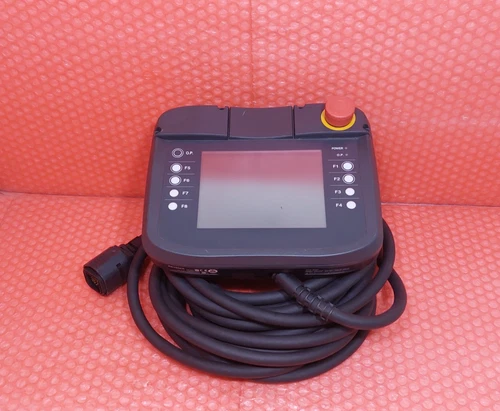
The KEYENCE VT3-Q5H is a touch interface panel designed for industrial automation and machine control applications. It belongs to the KEYENCE VT3 series of operator interface terminals, providing a graphical interface for monitoring equipment status and interacting with automated machinery.
The VT3-Q5H is intended to provide operators with access to machine operating information, control commands, and process-related data through a touchscreen interface. It can be integrated into compatible industrial control systems for equipment operation, production monitoring, and process supervision.
Typical applications include factory automation, production machinery, packaging equipment, material handling systems, and industrial process control panels.
This unit is suitable for industrial maintenance, HMI replacement projects, and restoration of existing KEYENCE-based automation installations. Verify display specifications, communication interfaces, system compatibility, and configuration before replacement.
🔹 Product Parameters
- Brand: KEYENCE
- Model: VT3-Q5H
- Series: VT3 Series
- Product Name: Touch Interface Panel / HMI
- Manufacturer: KEYENCE Corporation
- Place of Manufacture: Not confirmed
- Product Status: Not specified; verify actual inventory condition
- Dimensions: Exact dimensions not verified
- Weight: Exact weight not verified
- Country of Origin: Confirm from product nameplate
- Power Requirements: Refer to the original equipment specifications
- Display Type: Industrial Touchscreen
- Application: Machine Operation and Industrial Automation
- Certification Marking: KCC-REM-KEY-0976A
- Discontinued Status: Confirm with KEYENCE regarding current availability
🔹 Daily Maintenance and Care
- Clean the touchscreen with a soft, lint-free cloth.
- Avoid abrasive cleaners and excessive moisture.
- Inspect the display surface for scratches, cracks, and discoloration.
- Check power and communication connectors regularly.
- Keep the control cabinet clean and adequately ventilated.
- Inspect wiring for loose terminals and signs of overheating.
- Back up HMI project files and configuration data where supported.
- Monitor touchscreen response and display performance during operation.
- Check mounting brackets and panel seals periodically.
🔹 Troubleshooting and Common Problems
1. Touchscreen Does Not Respond
- Check the power supply.
- Inspect the touchscreen surface for physical damage.
- Restart the HMI according to the equipment procedure.
- Verify internal touch-panel hardware condition.
2. Display Is Blank
- Check the power connections and supply voltage.
- Inspect fuses and wiring.
- Check for display backlight or internal hardware failure.
3. Communication Failure
- Inspect communication cables and connectors.
- Verify communication settings and connected PLC configuration.
- Check the interface and communication status of the control system.
4. Incorrect Screen Data
- Verify the HMI project configuration.
- Check PLC communication and data mapping.
- Confirm that the correct project version is installed.
5. Intermittent Operation
- Inspect power stability and grounding.
- Check connector seating and cable condition.
- Investigate electrical interference and cabinet temperature.
🔹 Safety Precautions
- Disconnect power before installation or maintenance.
- Follow industrial electrical isolation procedures.
- Verify the supply voltage and polarity before connecting the panel.
- Use ESD protection when handling electronic components.
- Do not operate the panel with damaged wiring or connectors.
- Avoid exposing the touchscreen to excessive moisture, dust, or chemicals.
- Confirm communication wiring before connecting to the PLC.
- Installation and commissioning should be performed by qualified automation technicians.
🔹 Recommended KEYENCE Models
The following 15 KEYENCE products and model families are related to industrial HMI, PLC, sensing, and automation applications. They are not confirmed direct replacements for the VT3-Q5H.
- KEYENCE VT3-V6 – VT3 Series Touchscreen Interface
- KEYENCE VT3-W4 – VT3 Series Operator Interface
- KEYENCE VT3-V7 – VT3 Series Touch Panel
- KEYENCE VT2-10SB – Touchscreen Operator Interface
- KEYENCE VT2-12SB – Industrial Touch Panel
- KEYENCE VT5-W07 – VT5 Series HMI
- KEYENCE VT5-W10 – Industrial Touchscreen HMI
- KEYENCE KV-8000 – Programmable Logic Controller
- KEYENCE KV-7500 – High-Speed PLC
- KEYENCE KV-5500 – Programmable Logic Controller
- KEYENCE KV-3000 – PLC Control Unit
- KEYENCE KV-NC32T – PLC Network Communication Unit
- KEYENCE IV3-G500CA – Vision Sensor
- KEYENCE LJ-V7001 – Laser Displacement Sensor Controller
- KEYENCE DL-RS1A – Communication Unit
Before selecting a replacement, verify the complete model number, screen configuration, communication protocol, mounting dimensions, and project compatibility.
 E-mail:dcsplcsales@gmail.com
 Wechat:+86 13365909307
 Phone:+86 13365909307