

🔹 Product Description
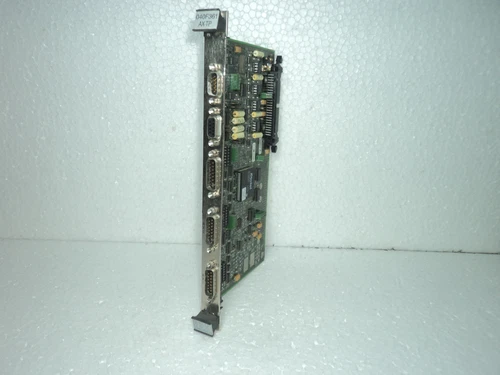
The E.C.S. 040F361 Ax-TP 040F163 Rev.H AXIS Card is an industrial electronic control board designed for specialized machine automation and motion control applications.
This AXIS Card is associated with the CMS Brembana Speed 3 industrial machinery platform. It serves as a machine control electronic component within the automation architecture, supporting axis-related control functions and communication with other machine control components.
The 040F361 board is intended for integration into compatible industrial control systems. Its electronic circuitry provides dedicated machine control functionality, making it an important spare part for equipment maintenance, system restoration, and replacement of defective control boards.
The Rev.H designation identifies the hardware revision and should be checked carefully when selecting a replacement. Correct part number, board revision, connectors, and machine configuration are essential for ensuring compatibility.
🔹 Product Parameters
- Brand: E.C.S.
- Model: 040F361 Ax-TP
- Part Number: 040F163
- Series: Ax-TP Industrial Control Series
- Product Name: AXIS Control Card
- Hardware Revision: Rev.H
- Application: Industrial Machine Automation and Axis Control
- Compatible Equipment: CMS Brembana Speed 3 (subject to machine configuration verification)
- Product Status: Industrial Electronic Spare Part
- Dimensions: To be verified from the physical board
- Weight: Dependent on board configuration and packaging
- Country of Origin: Not confirmed; check product label
- Power Requirements: Machine-specific DC supply; verify electrical specifications
- Discontinued: Lifecycle status not confirmed
🔹 Main Features
- Dedicated industrial machine control circuitry
- Axis-related control functionality
- Designed for integration into compatible automation systems
- Industrial PCB construction
- Hardware revision identification for replacement matching
- Suitable for equipment repair and maintenance
- Supports restoration of existing machine control systems
🔹 Daily Maintenance and Care
- Inspect the PCB for damaged components, discoloration, or burnt areas.
- Check connectors and terminal contacts for oxidation or loose connections.
- Keep the circuit board free from dust, oil, and conductive contamination.
- Check cabinet ventilation and operating temperature.
- Inspect cable connections and wiring harnesses periodically.
- Check the power supply for abnormal voltage fluctuations.
- Monitor machine axis operation for unexpected movement or control errors.
- Record hardware revision and identification numbers before replacement.
- Store spare boards in antistatic packaging.
- Perform periodic machine diagnostics according to the equipment manufacturer’s maintenance schedule.
🔹 Troubleshooting and Common Problems
Q1: Why does the machine fail to recognize the AXIS Card?
A: Check board installation, connector seating, backplane connections, and compatibility with the machine controller.
Q2: Why does the machine report an axis control fault?
A: Inspect the AXIS Card, associated wiring, axis feedback devices, drive connections, and machine control parameters.
Q3: Why does the board fail to power up?
A: Check the machine’s DC power supply, protective fuses, power connectors, and PCB condition.
Q4: Why does the machine operate intermittently?
A: Inspect connectors, solder joints, cable harnesses, cabinet temperature, and possible electrical interference.
Q5: Can a Rev.H board replace another hardware revision?
A: Not automatically. Verify the complete part number, hardware revision, firmware requirements, connector layout, and machine configuration before installation.
Q6: What should be checked before installing a replacement?
A: Record the original board identification, wiring positions, configuration data, and machine-specific parameters. Compare the replacement board before powering up.
🔹 Safety Precautions
- Disconnect the machine power supply before removing or installing the PCB.
- Allow stored electrical energy to discharge before handling the board.
- Use an antistatic wrist strap and appropriate ESD protection.
- Never touch exposed electronic components unnecessarily.
- Verify connector orientation and board compatibility before installation.
- Do not apply power without confirming the required supply voltage.
- Installation and commissioning should be performed by qualified technicians.
- Test machine safety interlocks and emergency stop functions after replacement.
- Follow the original machine manufacturer’s maintenance procedures.
🔹 Recommended E.C.S. Models and Related Spare Parts
- 040F361 Ax-TP – AXIS Control Card
- 040F361 Ax-TP-EXP – Axis Expansion Card
- 040F163 – AXIS Card Part Number
- 040F481 – CPU486-I/O Control Board
- 040T482A – Industrial Control Board
- 900F501-Z – Industrial Electronic Control Board
- 900F191-Z – Interface Board
- 040F361 Rev.H – AXIS Card Hardware Revision
- AX-TP-EXP Rev.H – Axis Expansion Board
- AX-TP Industrial Control Board – Machine Control Component
- E.C.S. CPU486-I/O – Processor and I/O Board
- E.C.S. Axis Interface Board – Axis Signal Interface
- E.C.S. Machine Control PCB – Machine Automation Board
- E.C.S. Axis Expansion PCB – Axis System Expansion
- E.C.S. Control Interface PCB – Machine Communication Interface
Note: The recommendations include related part numbers and functional board categories, not 15 independently verified interchangeable models. Confirm exact E.C.S. part numbers and machine compatibility before ordering.
 E-mail:dcsplcsales@gmail.com
 Wechat:+86 13365909307
 Phone:+86 13365909307