

🔹 Product Description
The Honeywell D25-UUUUUUUU-A0000000-000-F-0000-00-E is identified as a D25 control system configuration associated with the Honeywell D25 Multifunction Intelligent Electronic Device (IED) platform.
The D25 platform is designed for industrial power system automation, substation monitoring, electrical protection, and remote control applications. Its architecture supports data acquisition, digital and analog signal processing, communication interfaces, and system monitoring.
The display interface provides operators with access to system status, selected measurement values, alarms, and control information, depending on the installed hardware and software configuration.
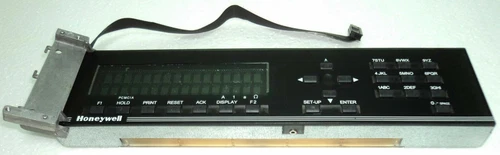
Typical applications include:
- Electrical substation automation
- Power distribution monitoring
- Remote terminal and control systems
- Industrial electrical monitoring
- Digital and analog signal supervision
- Utility power system maintenance
The complete ordering code should be checked against the equipment nameplate before replacement because D25 configurations can differ in display type, I/O arrangement, communication options, and enclosure configuration.
🔹 Product Parameters
- Brand: Honeywell
- Model: D25-UUUUUUUU-A0000000-000-F-0000-00-E
- Series: D25 Multifunction IED
- Product Name: Control Display Panel / D25 System Configuration
- Manufacturer: Honeywell (GE Energy Services legacy platform)
- Place of Manufacture: Not confirmed
- Product Status: Verify actual inventory condition
- Dimensions: Exact configuration dimensions not verified
- Weight: Not verified for this exact configuration
- Country of Origin: Not confirmed
- Power Requirements: Depend on the installed D25 hardware configuration
- Display Type: Configuration-dependent LCD or graphic display
- Application: Substation Automation and Electrical Monitoring
- Communication: Configuration-dependent serial and Ethernet interfaces
- Discontinued Status: D25 configuration references are listed as discontinued by some industrial parts suppliers; confirm exact model availability.
🔹 Daily Maintenance and Care
- Inspect the display panel for scratches, cracks, and physical damage.
- Clean the display surface using a soft, lint-free cloth.
- Keep the D25 enclosure clean and free from excessive dust.
- Check power supply connections and terminal blocks.
- Inspect communication cables and interface connectors.
- Monitor front-panel status indicators during normal operation.
- Check alarm records and investigate recurring system warnings.
- Back up application software and configuration files.
- Verify the operation of installed LCD or graphic display components.
- Maintain records of hardware revisions and installed communication modules.
🔹 Troubleshooting and Common Problems
1. Display Panel Does Not Turn On
- Check the D25 power supply.
- Inspect internal display connections.
- Verify the ribbon cable and display circuit board.
- Check the main controller status indicators.
2. Display Shows Incorrect Information
- Verify the D25 database configuration.
- Check input point mapping.
- Confirm the installed display application software.
- Inspect communication between the display and main controller.
3. Communication Failure
- Inspect serial and Ethernet connections.
- Verify communication parameters.
- Check the installed XCOM modules.
- Review system diagnostic messages.
4. Display Freezes or Responds Slowly
- Check controller operating status.
- Inspect application software and configuration.
- Verify power supply stability.
- Check for hardware or memory-related faults.
5. Alarm or Status Indicator Abnormality
- Review the system alarm history.
- Check installed I/O modules.
- Inspect field wiring and signal connections.
- Refer to the D25 diagnostic procedures.
🔹 Safety Precautions
- Disconnect power before servicing internal components.
- Follow electrical isolation and lockout/tagout procedures.
- Verify that all stored electrical energy has been discharged.
- Use ESD protection when handling electronic circuit boards.
- Do not remove or insert modules while energized unless specifically permitted by the manufacturer’s procedure.
- Verify wiring and connector assignments before installation.
- Do not modify protection or control configurations without authorization.
- Ensure the system passes functional checks before returning it to service.
- Maintenance should be performed by qualified electrical and automation technicians.
🔹 Recommended Honeywell Models
The following Honeywell and legacy GE Energy Services products are related to industrial control, substation automation, display, and monitoring applications. They are not confirmed direct replacements for the D25 configuration.
- Honeywell D25 – Multifunction Intelligent Electronic Device
- Honeywell D20 – Substation Automation Controller
- Honeywell D200 – Remote Terminal Unit
- Honeywell D25A – Analog Input Module
- Honeywell D25K – Digital Output Module
- Honeywell D25S – Digital Input Module
- Honeywell D25K-4Z – Digital Output Module
- Honeywell D25KE – Digital Output Module
- Honeywell D25 DAC – Data Acquisition and Control Module
- Honeywell D25 XCOM – Communication Interface Module
- Honeywell D25 LCD Panel – Operator Display Assembly
- Honeywell D25 Graphic Display Panel – Graphic Operator Interface
- Honeywell DPR250 – Industrial Chart Recorder
- Honeywell DPR100 – Digital Chart Recorder
- Honeywell UDC3200 – Universal Digital Controller
Always verify the complete configuration code, display assembly part number, firmware, communication interfaces, and installed D25 hardware before ordering.
 E-mail:dcsplcsales@gmail.com
 Wechat:+86 13365909307
 Phone:+86 13365909307