

🔹 Product Description
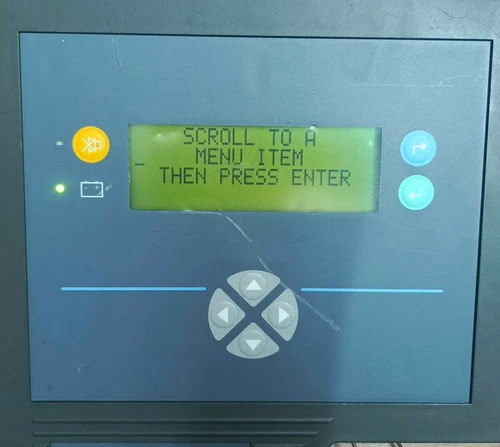
The ACCESS 4000 Control Panel 650-190 is an industrial operator interface designed for equipment monitoring, machine operation, and control system interaction.
The ACCESS 4000 series is associated with specialized industrial automation equipment. The 650-190 control panel serves as an operator-facing component, providing an interface between personnel and the machine’s electronic control system.
Designed for industrial maintenance and equipment integration, this panel is suitable for replacing damaged or defective operator interface hardware in compatible installations. Its application may include machine status monitoring, operator commands, and access to system operating functions, depending on the original equipment configuration.
The 650-190 part number should be matched with the original panel identification and machine documentation before installation.
🔹 Product Parameters
- Brand: ACCESS
- Model: 650-190
- Series: ACCESS 4000
- Product Name: Industrial Control Panel
- Manufacturer: ACCESS (exact manufacturer identity to be verified)
- Product Category: Industrial Operator Interface
- Application: Machine Monitoring and Control
- Product Status: Industrial Automation Spare Part
- Dimensions: Not confirmed; verify physical measurements
- Weight: Not confirmed; depends on panel configuration
- Country of Origin: Not confirmed; check product label
- Power Requirements: Refer to the original equipment nameplate
- Display Type: To be confirmed from the actual unit
- Discontinued: Current lifecycle status not confirmed
🔹 Main Features
- Industrial operator control interface
- Designed for compatible ACCESS 4000 equipment
- Supports machine operation and monitoring functions
- Dedicated industrial hardware construction
- Suitable for maintenance and replacement applications
- Part-number identification for equipment matching
- Integration with compatible machine control systems
🔹 Daily Maintenance and Care
- Inspect the control panel housing for cracks or physical damage.
- Clean the operator surface using a soft, non-abrasive cloth.
- Check buttons, switches, and other operating elements for proper response.
- Inspect electrical connectors for looseness or corrosion.
- Verify stable power supply conditions.
- Check display visibility and indicator status, if fitted.
- Keep the installation area clean and dry.
- Inspect panel mounting hardware and cable connections.
- Monitor abnormal alarms or unexpected operator interface behavior.
- Follow the equipment manufacturer’s scheduled maintenance procedures.
🔹 Troubleshooting and Common Problems
Q1: Why does the control panel fail to power on?
A: Check the incoming power supply, protective fuses, wiring connections, and panel power terminals.
Q2: Why are the operator buttons not responding?
A: Inspect the button contacts, connector wiring, control interface, and associated machine controller.
Q3: Why is the display blank or difficult to read?
A: Check panel power, display connections, backlight condition, and internal electronic components, if applicable.
Q4: Why does the panel fail to communicate with the machine?
A: Verify communication cables, connectors, interface configuration, and compatibility with the original controller.
Q5: Can another ACCESS 4000 panel replace the 650-190?
A: Confirm the complete part number, connector arrangement, electrical specifications, and machine software compatibility before replacement.
Q6: What should be checked before commissioning?
A: Verify wiring, power requirements, mounting, operator controls, and communication with the machine control system.
🔹 Safety Precautions
- Disconnect electrical power before installation or maintenance.
- Use qualified industrial electrical technicians for wiring work.
- Verify voltage and terminal assignments before energizing.
- Do not operate a panel with damaged wiring or exposed electrical components.
- Protect the panel from excessive moisture, dust, and vibration.
- Do not modify internal circuits without approved documentation.
- Test emergency stop and machine safety interlocks independently.
- Confirm correct panel compatibility before returning equipment to service.
🔹 Recommended Related Models
- ACCESS 4000 – Industrial Control System
- ACCESS 4000 650-190 – Control Panel
- ACCESS 4000 Operator Interface – Operator Control Unit
- ACCESS 4000 Display Panel – Industrial Display Interface
- ACCESS 4000 Keypad – Operator Input Unit
- ACCESS 4000 CPU – Central Processing Unit
- ACCESS 4000 I/O Module – Input/Output Module
- ACCESS 4000 Power Supply – Power Supply Module
- ACCESS 4000 Interface Board – Communication Interface
- ACCESS 4000 Control Board – Electronic Control Board
- ACCESS 4000 Communication Module – Communication Unit
- ACCESS 4000 Expansion Module – System Expansion Unit
- ACCESS 4000 Relay Module – Relay Interface
- ACCESS 4000 Terminal Board – Electrical Connection Board
- ACCESS 4000 Monitoring Unit – System Monitoring Module
Note: The recommended list contains related functional component descriptions, not 15 independently verified orderable model numbers. Confirm the manufacturer’s identity, exact part number, and equipment compatibility before ordering.
 E-mail:dcsplcsales@gmail.com
 Wechat:+86 13365909307
 Phone:+86 13365909307