

⚙️ Product Introduction
The Woodward EasyGEN-2500-5 (8440-1884 K) is a genset controller designed for generator set management, monitoring, synchronization, and power control applications. It belongs to Woodward’s EasyGEN 2000 controller family and is intended for use in industrial power generation systems.
The EasyGEN series provides control functions for generator operation, helping coordinate generator performance, monitor operating conditions, and support reliable power distribution. It can be integrated into suitable generator control panels and power management systems.
With its integrated control and monitoring capabilities, the EasyGEN-2500-5 is suitable for industrial facilities, standby power installations, and generator-based power plants.
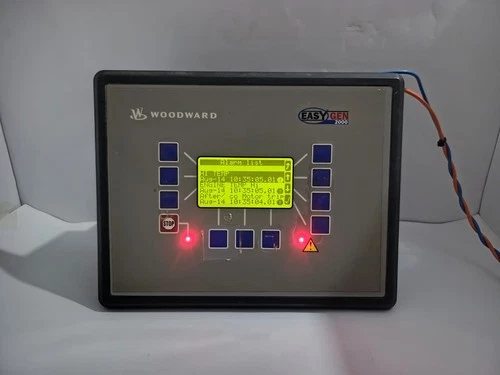
📋 Product Parameters & Datasheet
| Parameter | Description |
|---|---|
| Brand | Woodward |
| Model | 8440-1884 K |
| Series | EasyGEN 2000 |
| Product Name | EasyGEN-2500-5 Genset Controller |
| Place of Origin | Germany / Woodward manufacturing origin to be verified |
| Product Status | Industrial automation control equipment |
| Dimensions | Exact dimensions to be confirmed |
| Weight | Exact weight to be confirmed |
| Rated Power | Not applicable / controller power consumption requires datasheet verification |
| Discontinued Status | Current production status requires manufacturer confirmation |
Note: Specifications may vary by hardware revision. Please verify the nameplate, revision, and original technical documentation before installation or replacement.
🔧 Daily Maintenance & Care
1. Visual Inspection: Regularly inspect the controller housing, display, connectors, and wiring terminals for physical damage, corrosion, or loose connections.
2. Electrical Connections: Check terminal tightness and cable condition. Ensure that control wiring and power connections remain secure.
3. Dust Prevention: Keep the controller and its installation cabinet clean. Remove accumulated dust using suitable dry cleaning methods.
4. Environmental Conditions: Maintain suitable operating temperature, humidity, and ventilation inside the control cabinet.
5. Operational Monitoring: Review generator operating parameters, alarms, synchronization status, and controller indications during routine inspections.
6. Backup Configuration: Keep a secure copy of the controller configuration and parameter settings before performing maintenance or replacement.
7. Periodic Testing: Carry out functional checks according to the generator manufacturer’s maintenance schedule.
🛠️ Troubleshooting & Common Problems
1. Controller Does Not Power On
-
Check the 12/24 VDC power supply.
-
Confirm that the input voltage is within the specified 8–40 VDC range.
-
Inspect fuses, wiring terminals, and power connections.
-
Check for damaged internal components.
2. Generator Fails to Start
-
Verify the engine start signal and control output.
-
Check emergency stop circuits and configured start conditions.
-
Inspect engine protection alarms.
-
Confirm that the generator starting system is functioning correctly.
3. Synchronization Failure
-
Check generator voltage and frequency measurements.
-
Verify phase sequence and phase angle.
-
Inspect generator breaker feedback signals.
-
Review synchronization parameters and control settings.
4. Communication Problems
-
Inspect CAN bus and RS-485 wiring.
-
Check communication addresses and baud-rate settings.
-
Verify Modbus configuration and connected equipment.
-
Inspect cable shielding and grounding.
5. Incorrect Measurement Readings
-
Check current transformer polarity and wiring.
-
Verify that the 5 A CT secondary rating matches the controller configuration.
-
Inspect voltage measurement connections.
-
Confirm that measurement parameters are correctly configured.
⚠️ Safety Precautions
-
Disconnect the relevant power sources before performing maintenance or wiring work.
-
Only qualified electrical technicians should install or service the controller.
-
Never disconnect a live current transformer secondary circuit.
-
Verify voltage and current ratings before connecting external equipment.
-
Follow proper grounding and electrical protection requirements.
-
Do not modify safety or generator protection settings without authorization.
-
Back up the original configuration before replacing or reprogramming the controller.
-
Perform functional testing before returning the generator system to service.
⭐ Recommended Woodward Models
The following 15 Woodward models are worth considering for related generator control, synchronization, speed control, and power management applications.
| No. | Model | Product Name |
|---|---|---|
| 1 | 8440-1855 | easYgen-2200-5 Genset Controller |
| 2 | 8440-1856 | easYgen-2200-1 Genset Controller |
| 3 | 8440-1857 | easYgen-2200-5 Genset Controller |
| 4 | 8440-1858 | easYgen-2200-1 Genset Controller |
| 5 | 8440-1860 | easYgen-2500-1 Genset Controller |
| 6 | 8440-2058 | easYgen-2300-5 Genset Controller |
| 7 | 8440-2080 | easYgen-2300-5 Controller |
| 8 | 8440-2081 | easYgen-3100XT Controller |
| 9 | 8440-2082 | easYgen-3200XT Controller |
| 10 | 8440-2083 | easYgen-3200XT-LT Controller |
| 11 | 8440-2084 | easYgen-3400XT-P1 Controller |
| 12 | 8440-2085 | easYgen-3500XT-P1 Controller |
| 13 | 8440-2087 | easYgen-3400XT-P2 Controller |
| 14 | 8440-2088 | easYgen-3500XT-P2 Controller |
| 15 | 8440-2029 | easYgen-2500-5/P1-K33 Controller |
Model references are based on Woodward product documentation. Confirm package and revision compatibility before substitution.
📌 Technical Reference
The 8440-1884 is identified in Woodward documentation as the easYgen-2500-5/P1 with 5 A CT inputs. Its documented functions include generator monitoring, synchronization, load sharing, configurable I/O, and generator protection.
Product identification: Woodward 8440-1884 K / easYgen-2500-5
Important: Confirm the suffix K and hardware revision against the physical nameplate before ordering a replacement.
 E-mail:dcsplcsales@gmail.com
 Wechat:+86 13365909307
 Phone:+86 13365909307