

⚙️ Product Introduction
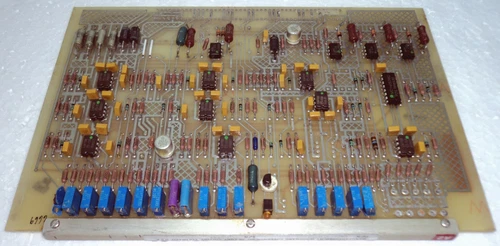
The Woodward 5500-310 (55003100) is an industrial electronic control board designed for use in specialized automation and control equipment.
As an electronic circuit board, it serves as part of an industrial control system, supporting signal processing, control functions, and communication between associated equipment, depending on the original system configuration.
Woodward products are widely used in industrial power generation, engine management, turbine control, and energy management applications. The 5500-310 should be identified and matched against the original equipment documentation before installation or replacement.
Key Features
-
⚡ Industrial electronic control board design.
-
🔧 Intended for integration with compatible control equipment.
-
🔄 Supports electronic control and signal-processing functions according to its configuration.
-
🏭 Suitable for industrial automation environments.
-
🛡️ Designed for use within an appropriate equipment enclosure.
-
🔌 Requires compatible electrical connections and system configuration.
📋 Product Parameters / Datasheet
| Parameter | Description |
|---|---|
| Brand | Woodward |
| Model | 5500-310 |
| Part Number | 55003100 |
| Series | Woodward Industrial Control |
| Product Name | Electronic Control Board |
| Place of Origin | United States (brand origin) |
| Product Status | Industrial electronic spare part |
| Dimensions | Not confirmed; refer to physical unit |
| Weight | Not confirmed |
| Rated Power | Not independently specified |
| Discontinued Status | Not confirmed; verify with manufacturer |
Additional Information
-
Product Type: Electronic Circuit Board
-
Application: Industrial Control Systems
-
Installation: Compatible control equipment or designated rack
-
Function: System-dependent electronic control and signal processing
-
Compatibility: Must be checked against the original equipment and hardware revision.
🔧 Daily Maintenance & Care
1. Visual Inspection
-
Inspect the PCB for cracks, corrosion, and damaged components.
-
Check connectors and terminal contacts.
-
Look for discoloration caused by overheating.
2. Dust Prevention
-
Keep the control cabinet clean.
-
Remove dust using appropriate antistatic cleaning equipment.
-
Avoid moisture and corrosive substances.
3. Electrical Inspection
-
Check power connections and grounding.
-
Inspect cables for insulation damage.
-
Confirm that connector contacts are secure.
4. Operating Environment
-
Maintain suitable cabinet temperature.
-
Avoid excessive vibration and humidity.
-
Keep the board away from electromagnetic interference sources.
5. Preventive Maintenance
-
Record operating faults and maintenance history.
-
Back up relevant control configurations where applicable.
-
Use qualified technicians for board testing and replacement.
🛠️ Troubleshooting & Common Problems
1. Control Board Does Not Respond
Possible causes:
-
Power supply failure.
-
Loose connectors.
-
Internal circuit damage.
Solutions:
-
Check the equipment power supply.
-
Inspect connectors and wiring.
-
Test the board using approved diagnostic procedures.
2. Intermittent System Operation
Possible causes:
-
Poor electrical contact.
-
Oxidized connectors.
-
Environmental interference.
Solutions:
-
Inspect connection points.
-
Check grounding and shielding.
-
Verify the stability of the power supply.
3. Communication Failure
Possible causes:
-
Damaged interface connections.
-
Incorrect system configuration.
-
Faulty communication components.
Solutions:
-
Inspect communication cables.
-
Verify system settings.
-
Check connected modules.
4. Board Overheating
Possible causes:
-
Poor cabinet ventilation.
-
Excessive ambient temperature.
-
Component deterioration.
Solutions:
-
Check cabinet cooling.
-
Remove accumulated dust.
-
Arrange professional inspection if overheating continues.
5. System Alarm or Unexpected Shutdown
Possible causes:
-
Control board malfunction.
-
External module failure.
-
Incorrect input signals.
Solutions:
-
Review system alarm records.
-
Check associated input and output modules.
-
Confirm the fault location before replacing components.
⚠️ Safety Precautions
-
Disconnect all relevant power sources before removing the board.
-
Use antistatic wrist straps and appropriate ESD protection.
-
Never insert or remove the PCB while energized unless the equipment explicitly supports hot swapping.
-
Verify the part number and hardware revision before installation.
-
Do not touch exposed electronic components unnecessarily.
-
Avoid applying incorrect voltage to the board.
-
Ensure proper grounding before restarting the equipment.
-
Only qualified technicians should perform electrical testing and repairs.
⭐ Recommended 15 Other Woodward Models
| No. | Model | Product Description |
|---|---|---|
| 1 | 5500-018 | DCS Extender |
| 2 | 5500-097 | DCS High Voltage Power Board |
| 3 | 5500-098 | DCS Power Supply Board |
| 4 | 5500-117 | Electronic Board |
| 5 | 5500-118 | Electronic Board |
| 6 | 5500-120 | Electronic Board |
| 7 | 5500-121 | Electronic Board |
| 8 | 5500-134 | Extender Card |
| 9 | 5500-142 | Electronic Board |
| 10 | 5500-143 | Electronic Board |
| 11 | 5500-145 | Electronic Board |
| 12 | 5500-159 | 505 Relay Board |
| 13 | 5500-316 | Electronic Board |
| 14 | 5500-330 | Electronic Board |
| 15 | 5500-332 | Relay Module |
These are additional Woodward part numbers, not confirmed direct replacements for 5500-310. Verify compatibility before ordering.
📌 Product Selection Reminder
When selecting the Woodward 5500-310 (55003100), pay attention to the complete part number, PCB revision, connector arrangement, and original equipment compatibility.
For older Woodward control systems, checking the product identification label and historical documentation is particularly important. Woodward provides product documentation and historical product support information for legacy equipment.
 E-mail:dcsplcsales@gmail.com
 Wechat:+86 13365909307
 Phone:+86 13365909307